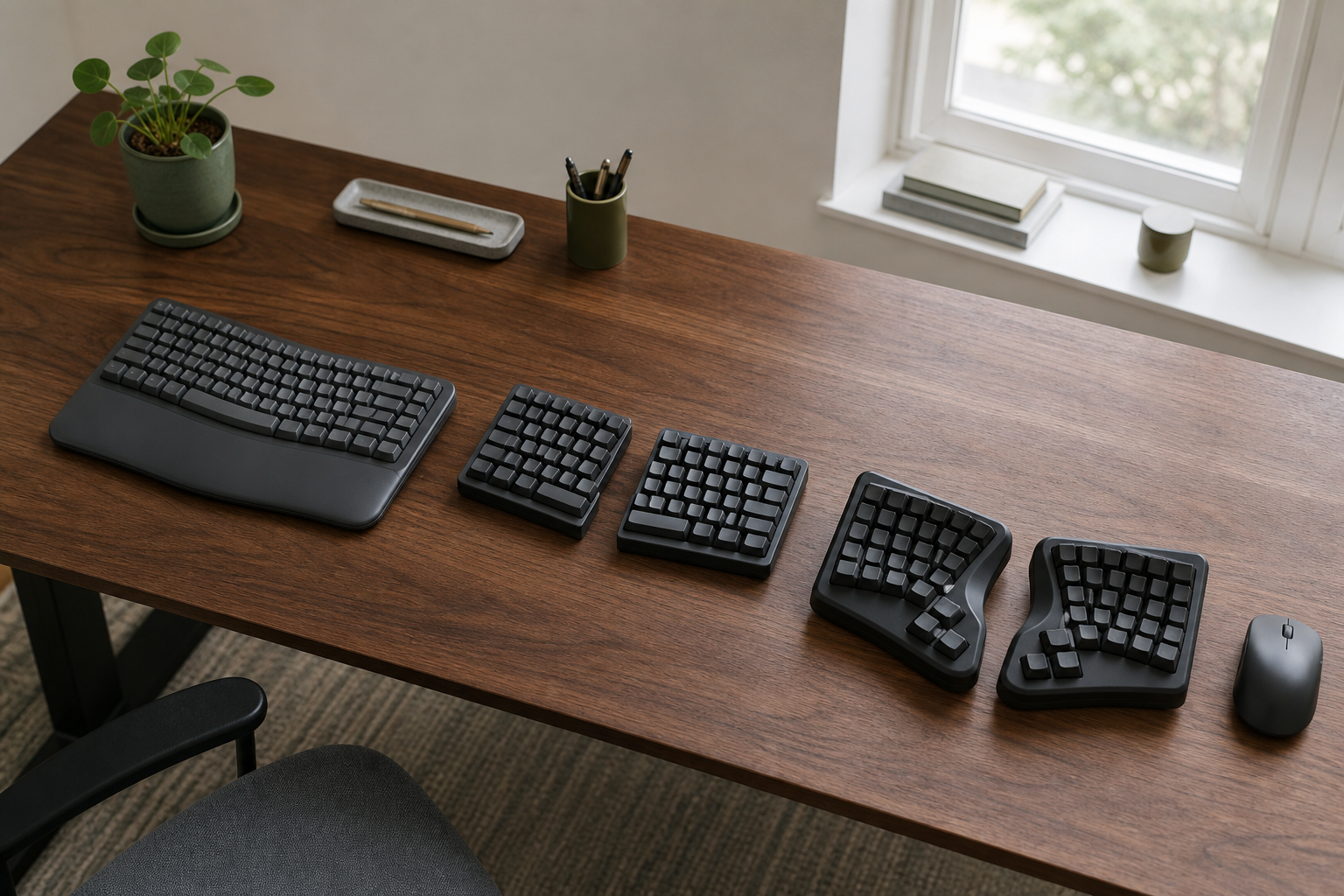
An ergonomic keyboard changes one or both of two things: where your hands can go, and where the keys are when they get there. Those are separate commitments. A keyboard with two movable halves can keep familiar staggered rows, while a contoured board can change the rows, thumb keys, and shortcuts as well as hand placement.
Choose the smallest change that solves the placement problem you can identify. That may be a fixed wave, independently placed halves, a programmable key-well layout, or keeping the current keyboard until the desk and pointing device fit.
A different shape cannot fix a keyboard surface that is too high
Before comparing layouts, place the current keyboard and pointing device where you can actually use them. OSHA’s keyboard guidance treats keyboard height, distance, pointer placement, and wrist angle as parts of one workstation. It also notes that evidence is not conclusive that alternative keyboards prevent discomfort or injury.
That creates a useful first boundary. If relaxed shoulders require raising the chair until your feet lose support, or if every keyboard position leaves the mouse out of reach, geometry is not yet the only variable. A keyboard tray may be the more direct change when the input surface is too high. A standing desk has to cover the needed input height in both positions before keyboard shape matters.
Use the current keyboard to answer three questions:
- Can the keys sit directly in front of you with elbows near your sides and forearms roughly level?
- Can the pointer stay close enough that reaching for it does not pull an elbow away from your body?
- Is the remaining problem the fixed angle between your hands, rather than the height of the whole input surface?
If the first two answers are no, resolve that setup constraint first. If only the third remains, form factor becomes a useful decision.
Wave, separated, or contoured: how much key geography can change?
A product name may contain “split” or “ergonomic” without telling you how much daily behavior changes. Classify the layout before comparing switches or software.
| Form factor | What changes physically | What stays familiar | What can eliminate it |
|---|---|---|---|
| Fixed wave or curved board | The key field has a built-in curve, but the board remains one piece. | One-piece placement and mostly conventional key geography. | You need to choose the distance, angle, or tenting of each hand independently. |
| Separated conventional layout | Two modules can move apart and rotate; tenting depends on the model or accessory. | Staggered rows and most expected key locations. | The modules, connecting cable, palm supports, and pointer will not fit the usable input surface. |
| Contoured programmable split | Separate halves add concave wells, column-oriented keys, thumb clusters, layers, or remapping. | The letter layout may remain QWERTY if selected, but physical key locations differ. | You cannot accept a learning and configuration project, or critical keys remain hard to reach in a trial. |
There are intermediate categories, including one-piece keyboards with a fixed center split and flat columnar boards. They may be the right answer, but they do not erase the central choice: fixed versus independently placeable hands, then familiar versus changed key geography.
Start with the smallest layout change that meets the placement need
The three keyboards below represent distinct levels of commitment. They are not a comfort ranking. Manufacturer specifications can establish layout, connection, and configuration; your own trial must settle reach, feel, and adaptation.
| Current example | Placement choice | Key and configuration change | Connection | Decide against it when… |
|---|---|---|---|---|
| Logitech Wave Keys | A fixed one-piece wave with an integrated cushioned palm rest; no independent half placement. | Familiar keyboard geography with customizable shortcuts through Logi Options+. | Bluetooth or the included Logi Bolt receiver; switches among three paired devices. | The fixed width or angle is the constraint you need the new keyboard to remove. |
| Kinesis Freestyle Edge RGB+ | Two staggered tenkeyless modules joined by an extendable link cable; the included lift kit offers 5°, 10°, or 15° tenting. | Conventional layout for basic use, with optional onboard or SmartSet remapping and macros. | Wired USB; basic keyboard use is listed for Windows, macOS, Linux, and ChromeOS. | You need wireless operation, a number pad on the main layout, or cannot fit two modules and the pointer. |
| MoErgo Glove80 | Wireless full split with concave key wells, six-key thumb clusters, and continuously adjustable built-in tenting. | An 80-key physical layout with web-based configuration and ZMK firmware; layers and remapping are part of the ownership decision. | Four Bluetooth Low Energy hosts plus one USB connection. | You want conventional staggered geography or need a low-friction returnable typing trial. |
Logitech Wave Keys keeps the board fixed and the setup simple
Wave Keys is the mild-change path. Its single chassis preserves the ordinary act of centering and moving one keyboard, and its current product page lists Bluetooth, an included Logi Bolt receiver, three-device switching, and support across Windows, macOS, ChromeOS, iPadOS, iOS, and Android. That breadth is useful when the same desk serves more than one device.
The limit is just as important: the two sides cannot move farther apart, rotate independently, or adopt different tenting. Choose it when a modest wave and familiar key map are the intended change. Eliminate it when independent placement is the reason for shopping.
Kinesis Freestyle Edge RGB+ changes placement before geography
The Freestyle Edge RGB+ is the bridge between a standard board and a specialist layout. Kinesis describes a conventional layout split into two modules, with an extendable 20-inch link cable, detachable palm supports, and the lift kit included in the current package. Its wired connection and tenkeyless shape should be treated as desk constraints, not background specifications.
The current quick-start guide shows that basic typing does not require the programming app. It also documents nine profiles, onboard remapping, and the removable three-height lift kit. You can therefore preserve the default geography or take on configuration later; neither choice is forced merely by separating the halves.
Measure the full arrangement, not one module. Separation consumes horizontal space, and the pointer still needs a reachable home. If the desk can support those positions and familiar staggered keys are a priority, this is the clearest middle path.
Glove80 makes layout learning part of the purchase
Glove80 is not a conventional keyboard cut down the middle. MoErgo’s specification lists concave wells, six-key thumb clusters, 80 keys, wireless full-split placement, continuous tenting, Bluetooth and USB connections, and a web configurator. These features open more placement and mapping choices, but they also make the physical map itself something to evaluate.
Do not infer hand fit from the number of adjustments. A thumb cluster can reduce movement for one person and leave an important key awkward for another. Before purchase, inspect the current default layout and use the configurator to locate every key you rely on, including navigation, symbols, function keys, and shortcuts. If that exercise already feels like unwanted maintenance, a separated conventional layout is the better branch.
A return window is not always permission to type for a month
Comfort, reach, switch feel, and adaptation cannot be predicted from a specification table. A real trial supplies that evidence only if the seller’s current terms allow the kind of use you have in mind.
As checked on August 29, 2026, the direct-store policies differ materially:
- Logitech’s Wave Keys page states free returns within 30 days of purchase.
- The Kinesis direct-store return policy provides a 60-day money-back period, while requiring the customer to pay insured return shipping and return the product in like-new, resellable condition.
- The MoErgo return policy gives 30 calendar days to initiate a return, but requires items to be new, complete, in perfect condition, in original packaging, and show no signs of use. It also assigns tracked shipping to New Zealand to the customer. That is not a dependable use-and-return trial for a US buyer.
Recheck the exact seller’s terms immediately before ordering; a reseller’s policy can differ from the manufacturer’s. Keep all packaging until the decision is final, and do not assume a return window permits visible use.
During a permitted trial, test the decisions that specs could not answer:
- Can each half sit at the intended angle without pushing the pointer farther away?
- Can you reach frequent keys and thumb controls accurately without changing the hand position you were trying to improve?
- Does the selected tenting remain stable at the desk height you actually use?
- Can you complete ordinary work without a missing key, shortcut, operating-system behavior, or remapping step becoming a recurring interruption?
There is no evidence-based universal adaptation time to wait out. If the layout keeps producing an unacceptable reach or workflow problem within the allowed trial, remove it from the shortlist.
Choose a form factor—or keep the current keyboard for now
Choose a fixed wave such as Wave Keys when one-piece placement is already workable and preserving familiar geography matters more than independent adjustment.
Choose a separated conventional board such as the Freestyle Edge RGB+ when the hands need independently adjustable spacing or angle, but relearning the physical key map is not part of the goal. Confirm the cable, modules, tenting hardware, palm supports, and pointer fit together.
Consider a contoured programmable board such as Glove80 only when concave wells, thumb clusters, layers, and remapping are changes you actively accept—not features you hope will become invisible. Arrange a suitable trial or hands-on preview before depending on it, because its current direct return terms do not provide a normal use-and-return path.
Keep the current keyboard when height, desk clearance, or mouse reach is the unresolved constraint. A new key shape is not a substitute for a workstation that can place both input devices where you can use them. Persistent pain, numbness, or weakness also calls for appropriate clinical advice rather than a keyboard recommendation.