Set the chair high enough for relaxed shoulders and level forearms. Now look down. If your feet no longer reach the floor comfortably, you have found the problem a footrest is meant to solve.
The important part is the sequence. Feet, chair, keyboard, and desk form one height relationship. A footrest completes that relationship when the work surface must stay where it is; a movable keyboard offers a more direct adjustment.
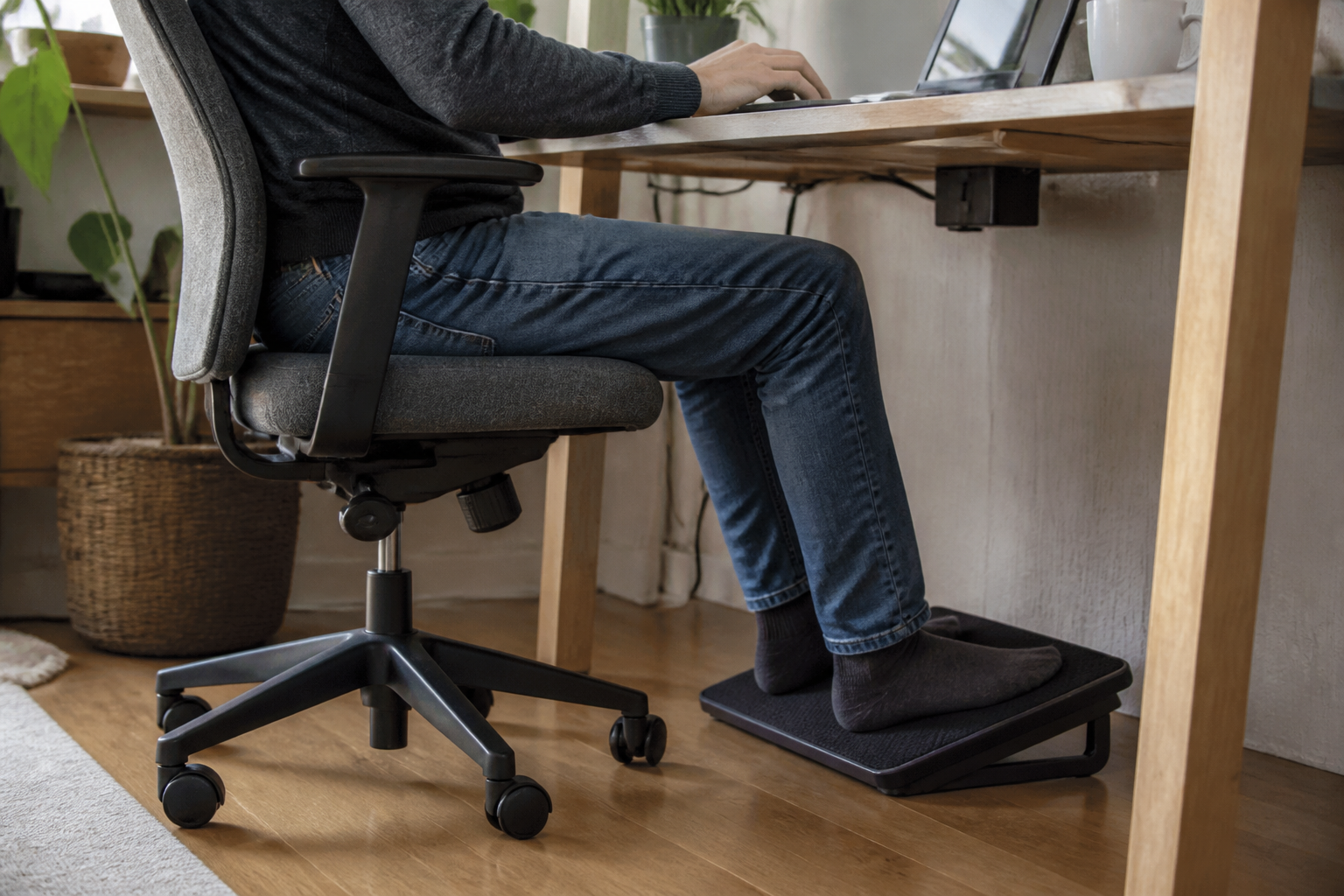
Let your hands set the chair height, then check your feet
Sit close enough to the desk to use the keyboard without reaching forward. Adjust the chair until your shoulders can settle, your elbows stay near your sides, and your forearms meet the keyboard without lifting the wrists. OSHA’s workstation position guide uses the same relationship: shoulders relaxed, elbows close to the body, forearms roughly parallel to the floor, and feet supported.
Two outcomes are common:
- Your hands, shoulders, and feet all feel settled. The floor is already doing the footrest’s job.
- Your upper body fits the desk only when the chair rises and your feet lose full support. The fixed work surface is taller than your seated proportions allow.
That second outcome creates a genuine decision. You can lower the input surface, change the desk, or bring the floor up to meet your feet.
A keyboard tray may solve the mismatch closer to its source
Before buying anything for the floor, check whether the keyboard can move down. A suitable tray lets the chair return to a height where the feet reach the floor while the hands remain at a comfortable level.
OSHA’s keyboard guidance emphasizes an input position that keeps elbows near the body and wrists aligned with the forearms. A tray has to preserve that position and leave room for the knees; a narrow shelf that forces the mouse onto the desk creates a new reach problem.
A height-adjustable desk can make the same correction across the whole surface. If desk replacement is already under consideration, measure the required seated height before comparing maximum standing height. Our standing-desk guide works through that measurement.
A footrest earns its place when the work surface stays where it is
A stable platform is often the smallest intervention when the desk belongs to an employer or landlord, a built-in counter cannot move, or a tray would collide with the frame. It supports the feet without asking the upper body to drop away from the keyboard.
Use this decision table before shopping:
| What happens after the chair is set for the keyboard? | First path to test | What would make it work? |
|---|---|---|
| Feet rest fully on the floor | Keep the floor as support | No accessory is needed for this height relationship |
| Feet float, and the keyboard can move lower | Lower the input surface | Keyboard and mouse stay together; knees retain clearance |
| Feet float, and the whole desk can change | Adjust or replace the desk | The finished surface reaches the measured seated height |
| Feet float, and the work surface is fixed | Add a footrest | Both feet receive stable support without crowding the legs |
The product has one clear role in the setup: supporting both feet while the chair remains at the height required by a fixed work surface.
Width and stability matter more than a long feature list
The platform should let both feet rest on it through normal small position changes. If one heel keeps slipping over an edge, the usable area is too small regardless of the dimensions printed on the box.
OSHA’s evaluation checklist looks for a footrest that is stable, angled, and supports both feet when needed. Oregon OSHA’s workstation guide adds practical shopping details: a portable support can be incline-adjustable, nonslip, large enough for both feet, and set no steeper than 30 degrees in that guide.
Those points translate into a short comparison:
| Detail | A useful check at home | The failure you are avoiding |
|---|---|---|
| Usable width and depth | Both feet fit with room to shift, not just touch | Holding the legs in one narrow position |
| Base grip | Push forward with both feet on the real floor surface | The platform sliding away during work |
| Angle | An easy ankle position with the whole foot supported | Balancing on heels or toes |
| Height | The chair can stay at the keyboard height while feet settle fully | Buying a platform that is still too low |
| Movement | Rocking is optional; the chosen support position stays stable | A feature that moves when you want support |
An adjustable model can be helpful when more than one person uses the station or the required height is uncertain. A fixed block can be entirely adequate when its dimensions already match. Upholstery, massage bumps, and branding are secondary to the platform staying put and fitting both feet.
Measure the missing height with books before choosing a product
You can test the idea without guessing. Keep the chair at the successful keyboard height and build a temporary platform from broad, stable books or another rigid household surface. Do this only for a seated measurement—do not leave an unstable stack as a working footrest.
Add height until both feet rest fully while the thighs remain comfortable and the knees fit below the desk. Measure the total height and the area your feet actually use. Those two measurements are more valuable than a generic “compact” or “ergonomic” label.
Then decide whether the permanent answer belongs on the floor or at the desk:
- If lowering the keyboard preserves mouse space and knee clearance, change the input height.
- If the whole surface is adjustable, set the desk to the measured seated position.
- If the surface must remain fixed, choose a stable footrest that reproduces the successful test height and supports both feet.
The useful result is a workstation where the upper body meets the keyboard while both feet have somewhere stable to settle. When the chair itself is the uncertain part, use the Aeron, Leap, and Fern fit guide to separate chair dimensions from desk-height problems.