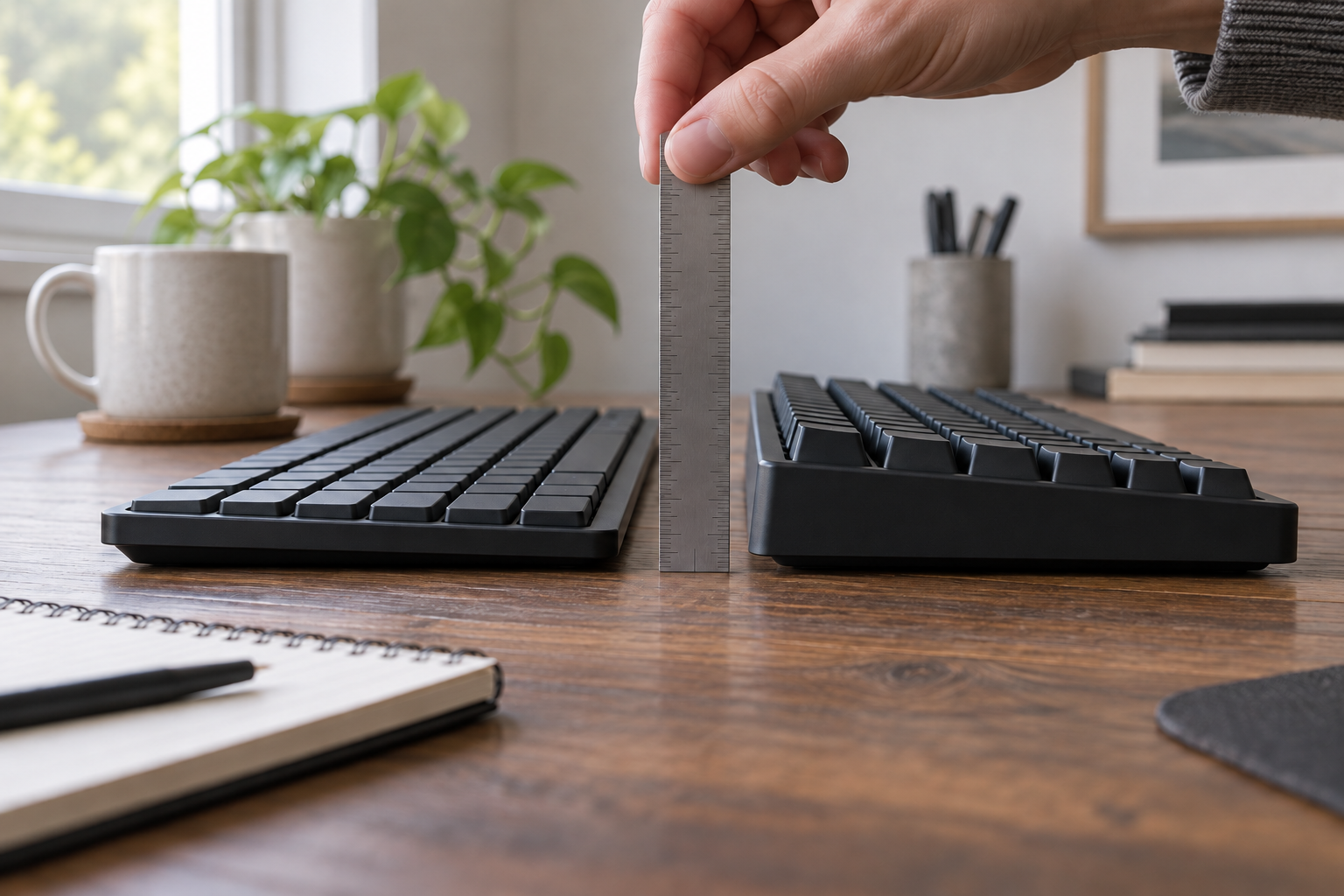
A low-profile keyboard is not automatically the more comfortable keyboard, and a standard mechanical board is not automatically the better typing tool. First find the vertical distance your setup can accept. Then choose among laptop-like, low-profile mechanical, and standard mechanical construction. Feel and sound come last, in a trial that keeps the work and workstation the same.
The key measurement is not the case’s thinnest marketing number. It is the distance from the desk or tray to the top of the keys your fingers use, plus the complete height at the front and rear edges. Measure those points on the current board before comparing specifications. When a maker does not define the exact point used for a published front or rear figure, treat that number only as an initial screen and repeat the measurement on the assembled candidate at your own reference points.
Measure from the desk to the home-row keys first
OSHA’s keyboard guidance treats keyboard height, distance, tilt, pointer position, chair height, and work-surface height as one arrangement. Its useful test is neutral alignment: shoulders relaxed, elbows near the body, and wrists straight and in line with the forearms. It does not endorse a low-profile or mechanical keyboard.
Set the current keyboard where you actually use it, then record these dimensions:
- Home-row key height: measure vertically from the work surface to the top center of the F or J key. This is the working height under the fingers, not necessarily the maker’s “front height.”
- Front complete height: measure to the top of the nearest keycap row, usually the row containing the space bar. This is the closest physical check against a maker’s keycap-inclusive front figure.
- Front case height: measure the enclosure at the edge your hands approach. This shows whether a palm support would meet the case, but it is not a substitute for either key measurement.
- Rear complete height: measure to the top of a key in the farthest row so the board’s complete slope is visible.
- Each feet position: repeat the rear measurement with retractable feet in every position you might use. A higher rear angle can bend the wrist upward; do not raise the feet merely because they are present.
- Usable surface height: note the chair, desk or tray, and foot-support settings. A keyboard number is not portable between two differently adjusted workstations.
Front approach
This is the height the hand must approach before a key moves.
Case and key are separate
A maker's case-only number cannot be compared directly with a keycap-inclusive number.
Rear angle
The same front edge can lead to a different hand angle when the rear rises.
Before replacing the keyboard, try the no-purchase route. Lower the work surface or tray, or raise the chair while keeping the feet supported, until the keys meet the forearms without lifted shoulders or wrists bent up or down. Keep the pointer beside the board at the same usable level. If the current keyboard then fits, profile was not the limiting variable. If the desk cannot reach a usable height, measure the correction with the keyboard-tray guide before asking a thinner board to solve the whole workstation.
A thin case does not tell you travel, force, or sound
Four measurements are often collapsed into the word “low-profile”:
- Complete front height determines how high the finger starts above the work surface.
- Case height describes only the enclosure unless the maker explicitly includes keycaps.
- Pre-travel is how far an exact switch moves before actuation.
- Total travel is the complete downward movement of that exact switch.
Operating force is another independent specification. A short-travel switch can be heavier than a longer-travel switch, and two switches with the same color name can have different data in different families. Keycap shape, plate, case, stabilizers, desk, and typing force also affect sound. No height or switch table can predict which complete keyboard you will prefer.
Layout is separate too. A full-size board can be low, and a 75% board can be tall. If key inventory or pointer room is the live question, use the full-size versus TKL versus 75% guide first. If the unresolved choice is split, wave, curved, or tented geometry, use the keyboard form-factor guide rather than treating profile as a substitute for geometry.
Choose laptop-like, low mechanical, or standard mechanical
The useful profile classes lead to different compromises:
| Path | Keep it on the shortlist when | Eliminate it when |
|---|---|---|
| Keep and reposition the current keyboard | Work-surface or chair adjustment puts the existing keys at a workable height and required keys already fit. | The complete board remains too high after a viable workstation adjustment. |
| Laptop-like low-profile board | A shallow complete board and familiar external-laptop-key approach matter more than replaceable switches or a broad keycap ecosystem. | The exact front key height is unverified, the full-size layout is wrong, or switch replacement is required. |
| Low-profile mechanical board | You want a lower mechanical package and accept the exact model’s low-profile switch and keycap compatibility limits. | The measured height still misses the setup or the restricted replacement ecosystem is unacceptable. |
| Standard-profile mechanical board | A broad conventional MX-style switch/keycap path matters and the measured workstation can accept the taller complete board. | The complete front height forces wrist extension or requires a support that simply raises the hand farther. |
Profile is not a quality tier. A sealed shallow board may be the right complete appliance; a serviceable standard board may be the right long-term platform. Make that serviceability decision consciously rather than assuming all mechanical parts interchange.
Compare keycap-inclusive height, not the thinnest marketing number
The three current model examples below represent different paths, not a best-three ranking. Their official pages were checked on October 14, 2026. The height conventions are not uniform, so the table preserves each maker’s wording instead of manufacturing a false apples-to-apples figure.
| Exact example | Layout and mechanism path | Published height evidence | Footprint and weight | Connectivity and replacement boundary |
|---|---|---|---|---|
| Logitech MX Keys S | Full-size, low-profile scissor-key complete-board path | 20.5 mm published height; front/rear keycap heights are not published in the cited records | 430.20 × 131.63 mm; 810 g | Bluetooth Low Energy or Logi Bolt; no replaceable-switch path is published in the cited support record |
| Keychron K3 Max with Gateron low-profile Red | 75%, low-profile mechanical | 17 mm front and 22 mm rear including keycaps; published angles 2.5°, 4.2°, and 6.5° | 306 × 116 mm; 525 g | 2.4 GHz, Bluetooth, or wired; hot-swap version is limited to Gateron/Keychron low-profile mechanical switches |
| Keychron V1 Max fully assembled with Gateron Jupiter Red | 75%, standard-profile mechanical | 21.5 mm front and 29.4 mm rear without keycaps; published angles 3.5°, 7.1°, and 9.5° | 328.5 × 148.7 mm; 770 g ± 10 g | 2.4 GHz, Bluetooth, or wired; hot-swappable with most 3-pin and 5-pin MX mechanical switches |
Logitech’s current US support specification identifies scissor keys and supports the MX Keys S dimensions, weight, and dual wireless connection. It does not provide a front/rear keycap-inclusive pair, pre-travel, or an adjustable angle. The 20.5 mm published height is therefore not a guaranteed front home-row height. Measure a display or returnable sample if that front value is the reason for buying it. Its full-size layout is also a separate change from either 75% Keychron example.
The K3 Max has the cleanest published height convention for this decision: its current product specification lists front and rear values including keycaps. The page does not define the precise keycap points used, so 17 and 22 mm are screening figures rather than guaranteed matches for your home-row or outer-row measurements. Confirm the assembled candidate at the same points you recorded on the current board. The same page limits hot-swap compatibility to Gateron or Keychron low-profile mechanical switches. Choose this path only if the measured height, 75% layout, and smaller parts ecosystem all pass; “hot-swappable” alone does not mean standard MX compatibility.
The V1 Max keeps the 75% class and the same manufacturer’s remapping platform, which makes it a useful standard-profile counterexample. But its current specification labels both published heights “without keycaps.” Do not subtract or add a guessed keycap height. Measure the complete assembled board from the desk to the keycap top before comparing it with the K3 Max’s inclusive figure. What the page does establish is the broader stated compatibility with most 3-pin and 5-pin MX mechanical switches.
Check the exact operating system and remapping requirement before either mechanical decision. Logitech’s US support record lists Windows, macOS, iOS, Android, and Linux, but says systems other than Windows and macOS receive basic functions without software; do not assume the same remapping workflow on Linux. The K3 Max and V1 Max pages state that their Launcher web app supports key remapping and macros on macOS, Windows, and Linux. Confirm the current supported browser, wired-connection requirement, and the exact remap during the trial instead of treating an OS name as proof that every function works.
Availability is not a durable specification, and this guide makes no in-stock claim. Treat each official model link as a specification page and verify the exact layout, backlight, hot-swap status, and switch selection again before ordering.
The published weights are facts about these configurations, not a portability test. The MX Keys S is also wider because it is full-size, while the K3 Max and V1 Max differ in depth, battery, structure, and keycaps as well as profile. A lighter number does not establish bag durability, wireless reliability, or comfort in use.
Fix exact switches before comparing travel and force
To make the switch comparison inspectable, hold both mechanical examples to the listed linear Red configuration. That does not make their feel equivalent or establish current stock; it merely prevents a color-name comparison from floating free of a datasheet.
| Exact mechanism in the example | Type | Published actuation or operating force | Pre-travel | Total travel |
|---|---|---|---|---|
| MX Keys S scissor keys | Scissor | 60 g | Not published | 1.8 mm |
| Gateron low-profile 2.0 Red in the K3 Max | Linear | 50 ± 15 gf | 1.7 ± 0.4 mm | 3.2 ± 0.2 mm |
| Gateron Jupiter Red in the V1 Max | Linear | 45 ± 15 gf | 2.0 ± 0.6 mm | 4.0 mm maximum |
The MX Keys S values come from the same Logitech US support specification as its dimensions. The mechanical-switch figures come from Gateron’s current records for the KS-33 low-profile family and the Jupiter switch family. They apply only to the named mechanisms and variants. Brown, Blue, and Banana options have different mechanisms or values. The two Red mechanical-switch force tolerances overlap, and a scissor assembly is not interchangeable with either switch family, so the table does not support a claim that one complete keyboard feels definitively lighter.
MX Keys S still has no published pre-travel in the cited records, and its 1.8 mm total travel does not predict feel, sound, or accuracy. “Scissor” and “low-profile” name construction and geometry; neither supplies the result of a typing trial.
Type the same work before judging feel and noise
Specifications can eliminate a board that is too tall, lacks a required key, or uses an unacceptable parts ecosystem. They cannot establish accuracy, fatigue, sound, or preference. Test the remaining candidate beside the current keyboard with the same setup and work.
- Put both boards at the same work-surface height and use the measured feet position. Keep the chair, pointer, and any palm support unchanged.
- Use the same representative passage, spreadsheet operation, navigation sequence, and shortcuts. Repeat in the opposite order so the second run does not win from familiarity alone.
- Record wrong-key corrections, moments spent searching for a key, and any remap the workflow requires. Separate those layout observations from switch feel.
- If sound matters, record from the same microphone position and gain in the same room. Compare the recordings; do not infer office noise from switch type or a manufacturer’s adjective.
- Note preference after both a short familiarization and the real task. Do not turn one person’s preference into an ergonomic, speed, or productivity claim.
If the hands contact the desk or a pad, re-check whether the contact is at the palm, wrist, or forearm. The palm-support decision guide keeps that question separate from profile and explains why a pad should not become a ledge under the moving wrist.
Make the decision with one measured constraint and one trial
Keep the current keyboard when workstation adjustment puts its keys at a workable height and the layout already supports the task. No purchase is a successful result.
Shortlist MX Keys S when a full-size, laptop-like scissor board is the intended path and a physical measurement confirms its front key height. Its published 20.5 mm height alone is not enough to settle that fit.
Shortlist K3 Max when its published 17 mm front and 22 mm rear keycap-inclusive screening figures are plausible, a same-reference measurement on the assembled board confirms the fit, a 75% layout passes the work trial, and the limited low-profile switch ecosystem is acceptable.
Shortlist V1 Max when its broader stated MX-switch compatibility outweighs the taller package, and a complete-board measurement confirms that its unpublished keycap-inclusive height fits the workstation.
Eliminate any board whose stated support cannot perform the required remap on the exact work computer. Then trial only the boards that survive those checks. The right conclusion is not “low-profile is better” or “standard mechanical is better.” It is the exact board whose measured height, layout, operating-system support, connection path, and replacement boundary fit—and whose feel and sound survive the same work you actually do.