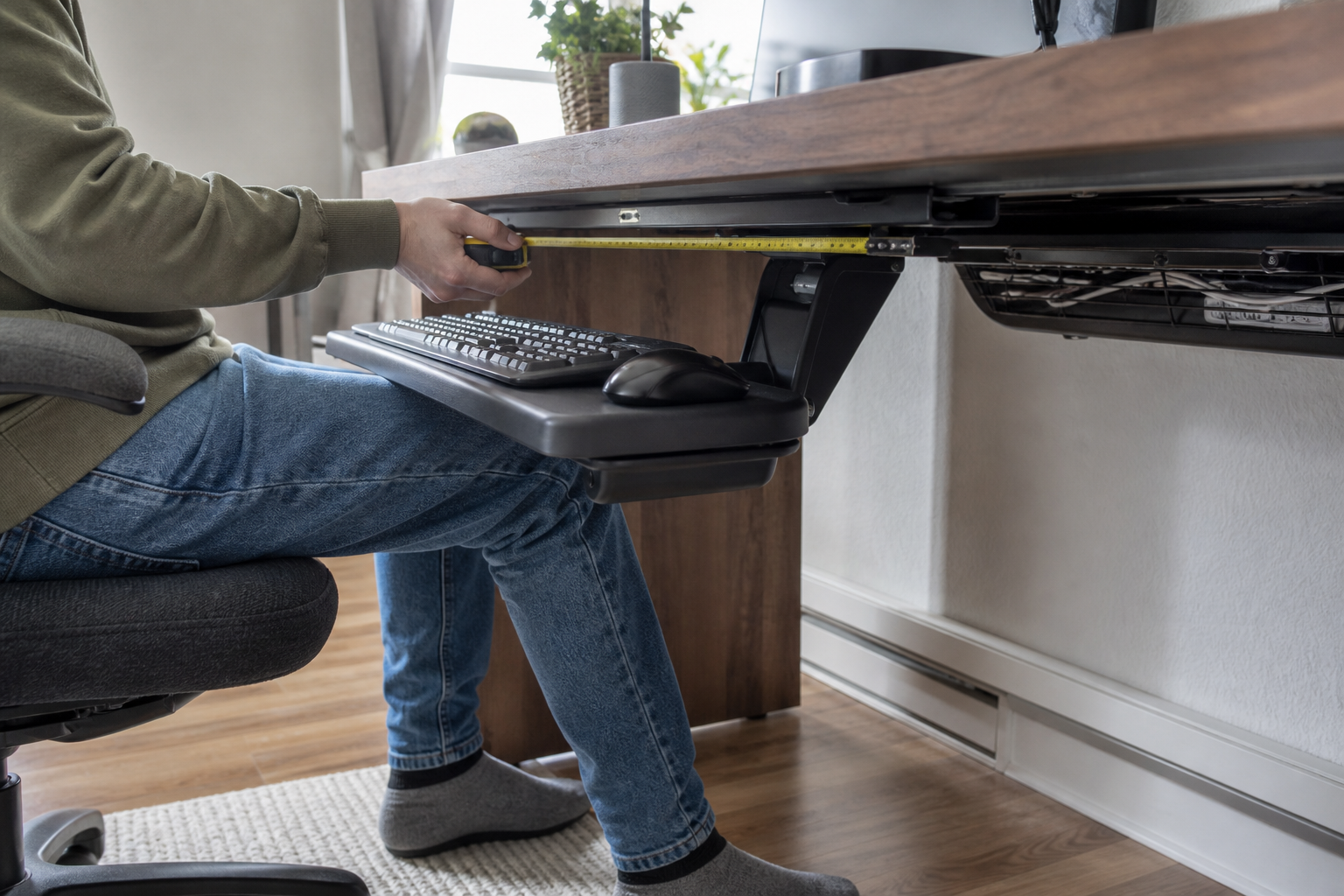
At a desk you otherwise like, a keyboard tray can lower the keys without replacing the whole work surface. The tradeoff appears underneath: the mechanism has to share that space with your knees, desk frame, drawers, and cable management.
Begin with the clear rectangle behind the front edge. Its depth determines which mounting systems can fit. Then check whether the keyboard and pointing device can reach a comfortable height while leaving enough room to sit and change position normally.
Keep the desk, lower the keys: when a tray is the smaller change
A tray is worth considering when the desk itself is useful but the input surface sits too high, too far forward, or leaves the mouse stranded at a different height. It is a narrower intervention than replacing the desk because it moves the keyboard-and-pointer surface rather than the whole worktop.
OSHA’s keyboard guidance treats the keyboard, pointer, chair, and work surface as one arrangement. Its practical requirements for a tray are useful buying criteria: height and tilt adjustment, adequate leg and foot clearance, and room for more than one input device. The target is not a particular tray angle; it is a setup in which the keyboard and mouse can sit close enough for relaxed shoulders and straight wrists.
A tray is most likely to solve the problem when three conditions line up:
- The existing work surface cannot reach the needed keyboard height through chair, desk, or foot-support adjustment alone.
- The desk underside provides a maker-approved, flat mounting area for the specified hardware.
- The required drop still leaves room for thighs, knees, and normal position changes.
When the whole surface needs to move between seated and standing work, compare the finished height range of the desk first. Our standing-desk guide starts with that measurement.
Open the space under the desk before opening a product page
Clear the area and photograph it once from below. Then record the measurements in this worksheet. It is more useful than beginning with a product’s maximum adjustment range because it describes the desk you actually own.
| What to record | How to check it | What it can rule out |
|---|---|---|
| Flat mounting rectangle | Measure the uninterrupted underside behind the front edge. | A track or mounting plate that runs into a drawer, rail, cable tray, or beveled edge. |
| Desk material and maker restrictions | Check the desk manual or ask the maker about fasteners, glass, hollow-core construction, and load limits. | A mount whose specified screws or concentrated load are not approved for the top. |
| Required drop | Measure from the desktop to the keyboard height that keeps your forearms comfortable. | A tray that cannot move far enough below the top. |
| Knee and thigh zone | Sit at the desk and note the space between your legs and every proposed tray part. | A mechanism that turns a height fix into a clearance problem. |
| Keyboard and pointer width | Place the actual keyboard and mouse or trackpad side by side as you use them. | A keyboard-only platform that sends the pointer back to the desktop. |
| Stowing depth | Measure from the desk edge back to the first obstruction. | A long track that cannot retract or a tray that collides with the desk frame. |
OSHA’s desk guidance makes the reason for this sequence clear: the space under a work surface has to accommodate changing seated positions, and a crowded underside can push a person farther from their keyboard and mouse. A tray manual cannot determine whether a particular desk is hollow, reinforced in the right place, or still under warranty after drilling. The desk maker’s restriction wins that conflict.
A lower keyboard helps only if your knees still fit
Set the chair for the keyboard position you want before treating a tray’s published travel as an advantage. Then look at the whole path from the desk edge to the tray’s lowest working position.
The important dimensions are connected:
- Drop is the vertical distance the keyboard must move below the desktop.
- Tilt changes the front and rear edge of the platform by different amounts.
- Track and arm position determine where the mechanism sits near your thighs and knees.
- Platform depth determines how far the keyboard and pointer project toward you.
Compare your required drop with the clearance that remains while you sit, reach for the pointer, and move your feet. The useful arrangement keeps the keyboard directly in front of you and the pointer nearby, on the same working plane.
This is also where a center drawer or a standing-desk crossbar becomes decisive. Removing or moving a factory part may have safety, structural, or warranty consequences. Treat it as a desk decision, not a shortcut in a tray installation.
The mouse needs room on the same working plane
Many product pages lead with keyboard width. The more useful question is where the pointing device goes during ordinary work.
If the keyboard fits but the mouse must stay on the desktop, the arm often reaches up and away every time the task changes. OSHA specifically calls out a tray that is too small for the pointer as a setup that can create a reach problem. A compact keyboard can change the calculation, but it should be your actual keyboard—not an assumed one—on the worksheet.
Check these details before comparing mechanisms:
| Setup detail | The question to answer | Why it changes the purchase |
|---|---|---|
| Full-size keyboard and mouse | Can both sit on one platform at your normal spacing? | Favors a wide platform or a separate, adjustable mouse platform. |
| Compact keyboard and trackpad | Does the smaller footprint still leave a stable pointing area? | May allow a smaller platform, but depth still matters. |
| Left-side pointer use | Can the mouse platform move or be ordered on that side? | Eliminates a fixed right-side arrangement. |
| Shared desk | Will each user need to change height or tilt regularly? | Favors an adjustment method that is practical to reset, not merely possible to adjust. |
Long track, short track, or no track: match the mechanism to the desk
With the worksheet complete, three mounting paths become easier to separate: a configurable conventional track, a compact fixed-table system, and a trackless direct mount.
| Mounting path | A current example | What to verify before choosing it |
|---|---|---|
| Configurable conventional track | UPLIFT Keyboard Tray System Builder | Enough uninterrupted underside depth for the selected track, the exact platform and mouse arrangement, and whether Economy or Quick-Adjust adjustment matches how often the tray will move. |
| Compact fixed-table system | Humanscale 6GSM for Fixed Tables | The exact 6GSM configuration, its 12.5-inch published track, the 0° to −15° tilt range, and current US availability for the selected platform. |
| Trackless direct mount | iMovR Trackless Keyboard Tray | A suitable flat mounting area, its published −1.25 to −6.98 inch height range, +10° to −15° tilt range, and the space needed as the tray swivels and stows. |
UPLIFT’s current builder makes the configuration choice explicit: its Economy mechanism sets height and tilt with one knob, while Quick-Adjust uses a lift-and-release height adjustment plus a tilt dial. It also offers platforms that place the keyboard and pointer together or use a side platform. That flexibility matters only after the desk can accept the chosen track.
Humanscale’s fixed-table 6GSM page publishes a 12.5-inch track and 0° to −15° tilt range. That compact track is most relevant when its exact base and platform fit the measured underside rectangle and leave the required clearance.
iMovR’s Trackless tray represents the other branch: direct mounting instead of a long conventional track. Compare its published adjustment range and swivel with the worksheet, then use the installation drawing and desk-maker guidance to settle fastener placement and desktop suitability.
The last check belongs to the desk maker and the mounting manual
Before ordering one exact configuration, keep the worksheet with the product’s current installation drawing and answer these final questions:
- Does the desk maker permit the proposed fasteners and concentrated load at that location?
- Does the selected platform fit the keyboard and pointing device together?
- Does the mechanism remain clear of your thighs, knees, desk frame, cable management, and any monitor-arm hardware?
- Is the tray intended for a fixed desk or for the way your height-adjustable desk moves?
- Does the return policy give you a realistic way to verify fit without modifying the desk beyond recovery?
Those answers can lead to a tray, a different adjustment to the desk, or a decision to leave the current surface alone. That is a successful comparison: it prevents a neat-looking accessory from becoming the new obstruction under a desk that already works.