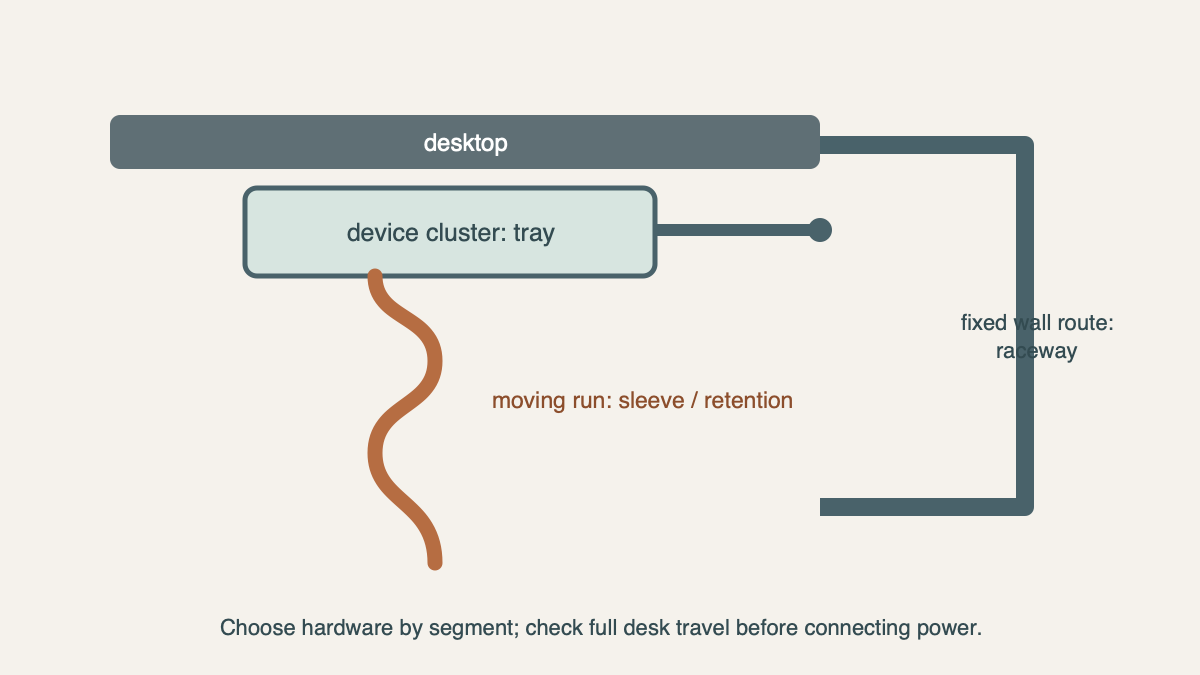
The cable pile below a desk usually has three destinations: a compact group of plugs and adapters that stays with the desktop, a lead that moves when the desk rises, and a fixed run that continues to the wall. Treating all three as one bundle creates the familiar problems—an overloaded tray, a taut charging lead, or a cable snaking across the floor.
Trace each cable from its device to its endpoint. The first useful split is simple: what stays under the desk, what moves with it, and what leaves it. That route decides whether a tray, a sleeve, a raceway, or a small clip does the better job.
Start with the moving cable, if the desk moves
For a height-adjustable desk, set the desk at its lowest and highest working positions before mounting anything. The vertical drop needs enough slack at both ends to avoid pulling on a connector, but that slack also needs a clear place to sit away from the frame, chair wheels, and knee space.
A sleeve or reusable ties work well for this section because they keep several moving leads together without making the route rigid. Let the sleeve follow the cable’s natural path from the desktop to the floor or wall. A tray can hold the adapter end of that route, but it cannot replace the flexible section between a moving desktop and a stationary outlet.
Put the device cluster in a tray
A tray is for the place where short cables, adapters, and a power device permitted by its own instructions collect near the back of the desk. It is not a tunnel for every cable in the room. The practical question is whether the actual plugs and bricks fit in the tray with enough room to connect and disconnect them.
IKEA’s FÖRSÄSONG cable-management tray is a current compact clamp-on example. It is 15 inches wide, 4¼ inches deep, and 6¾ inches high, with a listed maximum load of 7 pounds. Its spring clamp fits a horizontal surface from 5/8 to 1 5/8 inches thick, and the tray can face inward or outward.
Those dimensions make FÖRSÄSONG a good route to compare when the desk has a genuinely free edge and the cluster is modest: for example, a charger, a few small adapters, and the cable ends that stay beneath the desk. Make a 15-by-4¼-inch paper rectangle and place the actual adapters on it. If plug directions push the devices beyond the rectangle, compare a larger current screw-mounted tray using its own installation drawing rather than trying to force the cluster into a compact clamp-on model.
| Part of the route | Hardware to compare | Concrete fit check |
|---|---|---|
| Small cluster below a free desk edge | Clamp-on tray | FÖRSÄSONG: 15 × 4¼ × 6¾ in.; desk thickness 5/8–1 5/8 in.; listed 7 lb maximum. |
| Larger under-desk cluster | Current screw-mounted tray | Use the exact model's underside drawing, fastener requirements, and usable interior dimensions. |
| Moving vertical drop | Sleeve or reusable ties | Slack at the desk's lowest and highest positions, with no frame or chair collision. |
| Fixed wall or baseboard run | Raceway or trunking | Route length, corner changes, and a surface where the supplied mounting method can be used. |
A clamp needs a clear edge; a screw tray needs a clear underside
The distinction is more useful than “drill versus no drill.” A clamp-on tray shares the desk edge with monitor arms, keyboard trays, drawers, lips, and curved profiles. FÖRSÄSONG’s thickness range and 15-inch width tell you whether the edge is genuinely available. A screw-mounted tray instead needs a flat underside clear of frame rails, drawer boxes, grommets, and the hardware described in the under-desk keyboard-tray guide.
The desk maker’s mounting guidance has the last word on fasteners and a particular desktop construction. Once that is established, use the product’s current drawing to set the tray position so plugs remain reachable from the side or back.
Route wall cables after they leave the desk
A raceway becomes useful only after the cable has a fixed path from the desk to the wall. IKEA’s MONTERA cable management is designed for this kind of baseboard route: one pack contains six trunkings, listed at about 43 inches each and 260 inches total, and comes with double-sided tape for attachment.
Lay painter’s tape along the intended wall path before opening the pack. It reveals where a 43-inch length turns a corner and whether a door, chair path, or baseboard detail calls for another route. MONTERA is for a fixed wall run, not the section that moves with a sit-stand desk. Follow the power device’s own placement and use instructions when deciding what belongs in the tray.
Build the route in the order it has to work
Start with the moving drop, then place the device cluster, then add the fixed wall run. This order prevents a neat-looking tray from taking the only place where a moving cable needs to leave the desk. It also makes the smallest pieces of hardware useful: a sleeve for the flexible part, a tray for the accumulation point, and a raceway only where the cable has become a fixed wall route.
If the desk’s usable height is still undecided, map that before arranging the drop with the standing-desk height guide. If the cluster is growing because a dock carries display, charging, and peripherals, the laptop docking-station guide helps separate the connection decision from the cable route. A finished setup can use several forms together, but each one should have one clear section of cable to manage.